One Lineage, One Snapshot: What Databricks Serverless DataFrame Caching Changes for an Architect
On 23 October 2026 the product notes on AWS, Azure, and Google Cloud, and the serverless notes on each cloud, mark DataFrame caching on serverless compute as Public Preview. The same day’s other bullet is the Box Audit Logs connector, in Beta. I picked the cache. It changes the contract of df.cache(). The AWS and Google Cloud feature pages were last updated on 22 October. The AWS and Google Cloud October product notes still carry a 1 October header. I did not find a Databricks blog post, a LinkedIn post, or a Hacker News thread from this week. The comment that still ranks is from 6 May 2025, on the Neon thread: you cannot persist a DataFrame on serverless. That complaint is what this preview answers. Several pages have not caught up.
The variable is the key
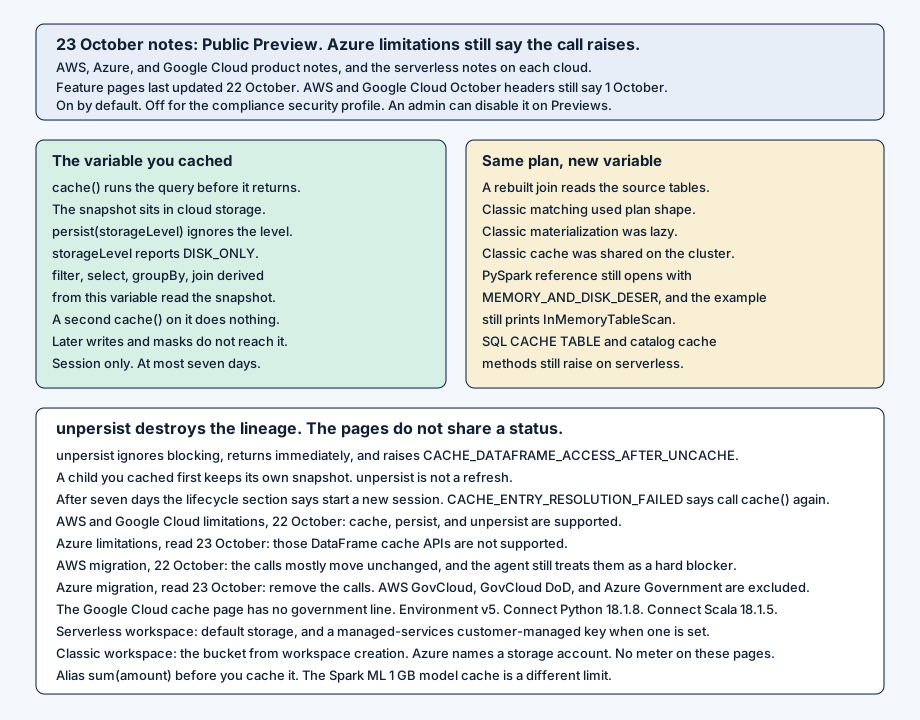
On classic compute, a cache can be shared across sessions on the cluster, and a query with the same plan shape can use it. Materialization waits for the first action. The serverless pages on all three clouds replace that. df.cache() runs the query before it returns and materializes a snapshot. After the call, that DataFrame reads the snapshot. A DataFrame you derive from it, with select, filter, groupBy, or join, reads the snapshot too. A new DataFrame that repeats the same query reads the source tables, because it is not derived from the cached variable.
joined = orders.join(customers, "customer_id")
joined.cache()
by_region = joined.groupBy("region").count()
again = orders.join(customers, "customer_id")
by_region reads the snapshot. again runs the join. A second cache() on a DataFrame that is already cached does nothing. If the compute fails, the call raises and the DataFrame stays uncached. Writes and schema changes that land after the call leave the snapshot fixed. To see the new rows, build the DataFrame again and cache that one.
persist accepts a storage level and ignores it. storageLevel returns DISK_ONLY while the DataFrame is cached, and NONE before the call and after unpersist. The PySpark reference on AWS, and the Google Cloud reference dated 22 October, still open with MEMORY_AND_DISK_DESER, and the example still prints InMemoryTableScan. The snapshot page says the bytes sit in cloud storage. A serverless workspace uses default storage, and a customer-managed key for managed services covers them when one is configured. A classic workspace uses the bucket created with the workspace. Azure names a storage account. I did not find a meter on these pages.
The snapshot holds what you were allowed to read at the call. A later permission change, row filter, or column mask does not apply to it. Another user of the same notebook cannot read it. Caching needs no extra privilege.
unpersist ignores blocking and returns immediately. Databricks reclaims the storage in the background. The DataFrame, and every DataFrame derived from it, then raise CACHE_DATAFRAME_ACCESS_AFTER_UNCACHE. A derived DataFrame you cached before that call keeps its own snapshot. unpersist ends the snapshot. It is not a refresh.
Seven days, and pages that still forbid the call
The snapshot lives in the session that created it, and for at most seven days. Past that, a read raises instead of falling through to the source tables, and the lifecycle section says to start a new session. CACHE_ENTRY_RESOLUTION_FAILED describes a long-lived session whose cached data was cleaned up, and it says to call cache() again. I would keep both sentences. The AWS and Google Cloud limitations pages, updated 22 October, also cap a serverless run at seven days. A run past that is terminated and is not retried.
CACHE_ACTIVE_LIMIT_EXCEEDED and CACHE_TOTAL_LIMIT_EXCEEDED name a session maximum. The error-class page, still headed 1 October, leaves both counts as parameters. I did not copy a number. One says to unpersist. The other says to start a new session. An older client raises CACHE_REQUIRES_NEWER_CLIENT_ON_SERVERLESS_GC. The floor is serverless environment version 5, Databricks Connect for Python 18.1.8, or Connect for Scala 18.1.5. The preview is on by default. An admin can turn it off from the Previews page. A compliance security profile workspace does not get it. The AWS cache page excludes AWS GovCloud and AWS GovCloud DoD. The Azure cache page excludes Azure Government regions. I did not find that exclusion on the Google Cloud cache page. The notes say a release can take a week or more to reach an account.
The AWS and Google Cloud limitations pages now say cache, persist, and unpersist are supported, and that checkpoint, CACHE TABLE, the spark.catalog cache methods, REFRESH TABLE, and CLEAR CACHE still raise. The Azure limitations page I opened on 23 October still says those DataFrame and SQL cache APIs are not supported, and it lists df.cache() in that set. The Azure migration page I opened the same day says df.cache is not yet supported, tells you to remove the calls, and still treats cache APIs as a hard blocker for the migration agent. The AWS migration page, updated 22 October, says df.cache() and df.persist() mostly migrate without code changes, and the same page still lists cache and checkpoint APIs as a hard blocker for that agent. The Azure PySpark reference still recommends leaving DataFrame.cache(). The AWS and Google Cloud references describe the session snapshot.
A column name with a space, or any of ,;{}()=, cannot be cached until you alias it. sum(amount) is the page’s example. Duplicate names, interval columns, an empty frame, a frame of only NULL-typed columns, and arrays, maps, or structs that contain NULL-typed values are out. After the call, selecting orders.amount through the pre-cache DataFrame raises CANNOT_RESOLVE_DATAFRAME_COLUMN. SQL still has no CACHE TABLE on serverless. The page points a SQL reuse at a session-local temporary table. Many sessions caching in one metastore can slow or time out information_schema.volumes and information_schema.schemata. The page says information_schema.tables is unaffected. The Spark ML model cache on the limitations page is a different object: 1 GB for the session and 100 MB for one model. The snapshot page does not print a byte cap.
Where it fits, and where it does not
I would cache a join, an aggregation, or a prepared feature frame that several later steps read inside one session, including one foreachBatch micro-batch written to several sinks, or several models on the same features. I would keep the variable, derive from it, alias sum(amount) first, and call unpersist when the notebook is done.
I would leave a plain spark.table read uncached. Later scans still read a full copy, so the page says the save is small, and a frame read once pays the materialization for nothing. A second notebook, a second job run, or another user of this notebook cannot see the snapshot. A result that has to cross sessions, survive seven days, or pick up a write I just committed belongs in a table.
What goes in the design doc
Write Public Preview, on by default, absent on a compliance security profile. Name environment version 5, the two Connect floors, cloud storage, the ignored storage level, and DISK_ONLY. Put the seven-day snapshot beside the seven-day run cap, and keep both recovery sentences. Row filters and column masks freeze at the call. Leave the Azure limitations page and the Azure migration table in the doc until they match the note. The May 2025 complaint explains the call. It is not a general-availability date.
References
- Databricks, “October 2026” release notes (AWS). DataFrame caching on serverless compute is Public Preview on 23 October. The page header still says 1 October. https://docs.databricks.com/aws/en/release-notes/product/2026/october
- Microsoft, “October 2026” release notes (Azure Databricks). The same 23 October Public Preview line, plus the Box Audit Logs connector in Beta. https://learn.microsoft.com/en-us/azure/databricks/release-notes/product/2026/october
- Databricks, “October 2026” release notes (Google Cloud). The page header still says 1 October. https://docs.databricks.com/gcp/en/release-notes/product/2026/october
- Databricks, “Serverless compute release notes” (AWS). https://docs.databricks.com/aws/en/release-notes/serverless/
- Microsoft, “Serverless compute release notes” (Azure Databricks). https://learn.microsoft.com/en-us/azure/databricks/release-notes/serverless/
- Databricks, “Serverless compute release notes” (Google Cloud). https://docs.databricks.com/gcp/en/release-notes/serverless/
- Databricks, “Cache DataFrames on serverless compute” (AWS), last updated 22 October 2026. https://docs.databricks.com/aws/en/compute/serverless/dataframe-cache
- Microsoft, “Cache DataFrames on serverless compute” (Azure Databricks). https://learn.microsoft.com/en-us/azure/databricks/compute/serverless/dataframe-cache
- Databricks, “Cache DataFrames on serverless compute” (Google Cloud), last updated 22 October 2026. https://docs.databricks.com/gcp/en/compute/serverless/dataframe-cache
- Databricks, “Serverless compute limitations” (AWS), last updated 22 October 2026. https://docs.databricks.com/aws/en/compute/serverless/limitations
- Microsoft, “Serverless compute limitations” (Azure Databricks), read 23 October 2026. The caching section still says the DataFrame and SQL cache APIs are not supported. https://learn.microsoft.com/en-us/azure/databricks/compute/serverless/limitations
- Databricks, “Serverless compute limitations” (Google Cloud), last updated 22 October 2026. https://docs.databricks.com/gcp/en/compute/serverless/limitations
- Databricks, “Migrate from classic compute to serverless compute” (AWS), last updated 22 October 2026. https://docs.databricks.com/aws/en/compute/serverless/migration
- Microsoft, “Migrate from classic compute to serverless compute” (Azure Databricks), read 23 October 2026. https://learn.microsoft.com/en-us/azure/databricks/compute/serverless/migration
- Databricks, “cache” PySpark reference (AWS). https://docs.databricks.com/aws/en/pyspark/reference/classes/dataframe/cache
- Microsoft, “cache” PySpark reference (Azure Databricks). https://learn.microsoft.com/en-us/azure/databricks/pyspark/reference/classes/dataframe/cache
- Databricks, “cache” PySpark reference (Google Cloud), last updated 22 October 2026. https://docs.databricks.com/gcp/en/pyspark/reference/classes/dataframe/cache
- Databricks, “Error conditions” (AWS), page header 1 October 2026. Includes
CACHE_ACTIVE_LIMIT_EXCEEDED,CACHE_TOTAL_LIMIT_EXCEEDED,CACHE_DATAFRAME_ACCESS_AFTER_UNCACHE,CACHE_ENTRY_RESOLUTION_FAILED, andCACHE_REQUIRES_NEWER_CLIENT_ON_SERVERLESS_GC. https://docs.databricks.com/aws/en/error-messages/error-classes - viccis, comment on “Databricks in talks to acquire startup Neon for about $1B,” Hacker News, 6 May 2025. https://news.ycombinator.com/item?id=43899252