One Node, Two Doors: What Databricks AI Runtime Changes for an Architect
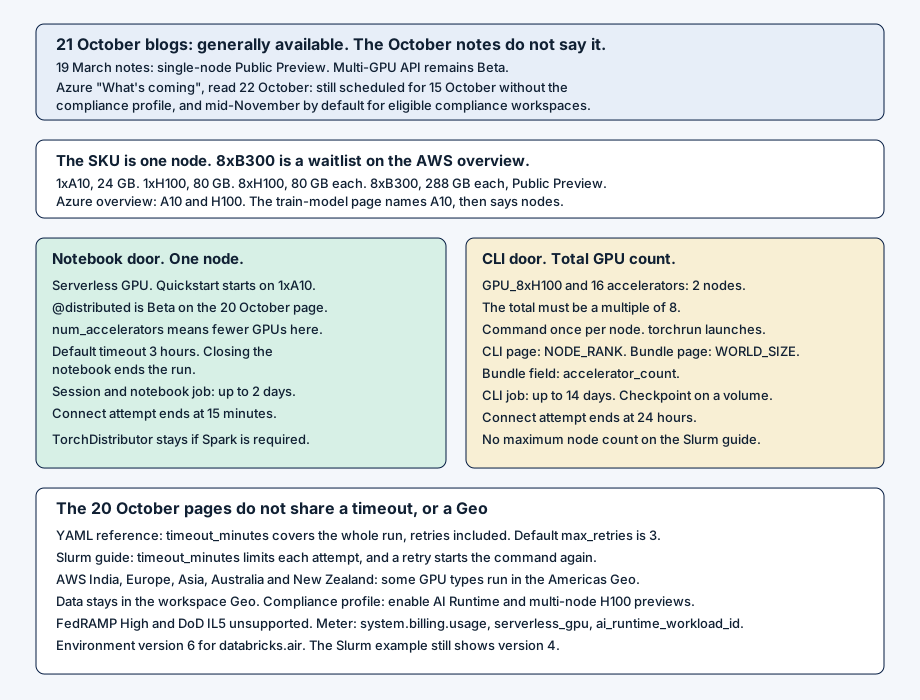
On 21 October 2026, Tejas Sundaresan, Jianwei Xie, Mike Del Balso, Hanlin Tang, Julia Powell, and Cynthya Peranandam called AI Runtime generally available. The same day a second post, with Joel Caruso and Mayank Tahilramani of NVIDIA, said the same thing at GTC Berlin. Unite.ai carried it. On 19 March the notes mark single-node AI Runtime Public Preview and leave the multi-GPU API in Beta. The October notes, through the 21 October MCP screening entry, have no general-availability line. The page header still says 1 October. 15 October is the MLflow Logs tab. 13 October is the SDK rename. Azure’s “What’s coming” page, read on 22 October, still schedules 15 October for workspaces without the compliance security profile, on AWS and Azure, and mid-November for eligible compliance workspaces. I did not find a Hacker News thread. LinkedIn, on 16 October, is sharing the Qwen post and the research post.
The accelerator type is one node
An accelerator type provisions one node. What you count is the door.
| Type | GPUs on the node | Memory | Notebook distribution |
|---|---|---|---|
| 1xA10 | 1 | 24 GB | No |
| 1xH100 | 1 | 80 GB | No |
| 8xH100 | 8 | 80 GB each | On that node |
| 8xB300 | 8 | 288 GB each | On that node. AWS overview: Public Preview |
The AWS overview, updated 20 October, puts 8xB300 behind a waitlist, through the account team. The Azure overview lists A10 and H100 and stops. The Azure train-model page names A10 GPUs, then says training can cross nodes.
The notebook door stays on the attached node. The quickstart, updated 20 October, selects Serverless GPU and starts on 1xA10. @distributed, from databricks.air, fans the function across that node’s GPUs. The page, also updated 20 October, still says Beta. The default timeout is 3 hours. timeout=None removes it, and a custom timeout needs GPU environment v5 or above. Closing the notebook ends the run. On this door num_accelerators means fewer GPUs on the same node. A workload that still needs Spark stays on TorchDistributor.
The CLI door can leave the node. databricks air run --file submits YAML. Here num_accelerators is the total GPU count, and the type says how many sit on a node. The Slurm guide, updated 20 October, is the sentence I would copy: GPU_8xH100 with 16 accelerators is two nodes, and the total has to be a multiple of the GPUs on the node. The command runs once per node. Both pages set NUM_NODES, LOCAL_WORLD_SIZE, MASTER_ADDR, and MASTER_PORT. The CLI page adds NODE_RANK. The bundle page adds WORLD_SIZE, and its field is accelerator_count. A checkpoint that must outlive the run goes on a Unity Catalog volume. pool_id selects provisioned capacity, with priority_class of BEST_EFFORT, NORMAL, or CRITICAL. The CLI page and the quickstart print no preview banner. I did not find a maximum node count on the Slurm guide.
compute:
  accelerator_type: GPU_8xH100
  num_accelerators: 16
Two clocks, and a timeout the pages split
A connection attempt ends at 15 minutes for an interactive notebook and at 24 hours for a notebook job or a CLI job. A connected notebook, and a notebook job, can run for two days. A CLI job can run for 14 days. Past that, checkpoint and start again. The decorator’s three hours sits inside the notebook clock.
timeout_minutes is where those pages split. The YAML reference says it bounds the whole run, retries included. Omit it and the default is unnamed. The Slurm guide says the same key bounds each attempt, and a retry starts the command again. The YAML default for max_retries is 3. The Slurm example sets 1 and still shows environment version 4. The YAML example uses version 6, where databricks-sdk-air replaces serverless_gpu. Version 6 ships both. Old names warn, and support ends in version 7. A CLI job that imports databricks.air.data adds databricks-sdk-air[data].
The commands split too. The Slurm table spells databricks air list runs and databricks air get run. The CLI page spells databricks air list and databricks air get. I would try the CLI page before copying the table into a runbook.
The meter is system.billing.usage. The guides page sums usage_quantity where product_features.serverless_gpu is set, and points at a pricing page. I did not copy a rate. The schema also has ai_runtime_workload_id, and usage_type includes GPU_TIME. Capacity can be missing. High demand can place the GPU in another region, with egress, and connectivity can be limited.
Residency is a Designated Service. On the AWS table, updated 14 October, the Americas are available. Asia, Australia and New Zealand, Europe, and India carry a footnote: some GPU types need cross-Geo processing, and on AWS that work runs in the Americas Geo. Data is not stored outside the workspace Geo. Mainland China, and Middle East and Africa, are not available. A compliance-profile workspace still needs an admin to enable the AI Runtime preview and the multi-node H100 preview. FedRAMP High and DoD IL5 are unsupported. A scheduled job on a workspace base environment, including the Databricks AI environment, is Beta.
The 21 October post also says warm pools, lazy image loads, VM-level isolation, PrivateLink, and serverless egress. The overview limitations do not, so those sentences stay in the blog. It prints more than 100,000 GPU-hours, and a Superhuman move from eight A100s to sixteen H100s, about seven days to 48 hours. I did not rerun it. The 14 October post argues the 6x Qwen result. The NVIDIA post adds NeMo, NGC, NCCL, and Quantum InfiniBand, then Model Serving. New MLflow logs are kept 60 days.
Where it fits, and where it does not
I would use the notebook when the model fits on one node, Beta on @distributed is acceptable, and a restart inside two days is fine. I would use the CLI when the count has to become a second node, with the checkpoint on a volume and the 14-day cap written down. A bundle turns that YAML into a job. The field there is accelerator_count.
I would not use it for FedRAMP High or DoD IL5, or assume an India workspace on AWS trains in India, or carry 8xB300 from the AWS quickstart onto the Azure table. 21 October is not the October note, and it does not retire the Beta banner. A compliance workspace stays on the preview switch until a note replaces the mid-November line.
What goes in the design doc
Write the label beside the door: 19 March, the 21 October blogs, the missing October line, and the Azure page that still says 15 October and mid-November. Draw one node, then each count. Name GPU_8xH100 with 16 as two nodes. Keep both timeout sentences and both variable lists. Pin environment 6 for databricks.air. Name the Geo, the egress case, the two run clocks, and the volume.
References
- Tejas Sundaresan, Jianwei Xie, Mike Del Balso, Hanlin Tang, Julia Powell, and Cynthya Peranandam, “AI Runtime is Generally Available,” Databricks Blog, 21 October 2026. https://www.databricks.com/blog/ai-runtime-generally-available
- Tejas Sundaresan, Hanlin Tang, Julia Powell, Joel Caruso, and Mayank Tahilramani, “Databricks AI Runtime and NVIDIA make it easier to customize open models with enterprise data,” Databricks Blog, 21 October 2026. https://www.databricks.com/blog/databricks-ai-runtime-nvidia-train-fine-tune-models
- Unite.ai, “Databricks Makes AI Runtime Generally Available for GPU Training,” 21 October 2026. https://www.unite.ai/databricks-makes-ai-runtime-generally-available-for-gpu-training/
- Bruce Fontaine and Pardis Beikzadeh, “Reducing Qwen training time by 6x on AI Runtime,” Databricks Blog, 14 October 2026. https://www.databricks.com/blog/reducing-qwen-training-time-6x-ai-runtime
- Ethan Tang, Ivan Zhou, Irene Dea, Steven Chen, Bruce Fontaine, and Ben Hansen, “How our AI Research team uses AI Runtime,” Databricks Blog, 15 October 2026. https://www.databricks.com/blog/how-our-ai-research-team-uses-ai-runtime
- LinkedIn post sharing the Qwen write-up, 16 October 2026. https://www.linkedin.com/posts/garrettcarey_reducing-qwen-training-time-6x-on-ai-runtime-activity-7516860256014987265-g7Z2
- LinkedIn post sharing the research write-up, 16 October 2026. https://www.linkedin.com/posts/victoriajhaley_how-our-ai-research-team-uses-ai-runtime-activity-7516845321742626816-sSqj
- Databricks, “March 2026” release notes (AWS). Single-node AI Runtime is Public Preview on 19 March, and the multi-GPU distributed training API remains Beta. https://docs.databricks.com/aws/en/release-notes/product/2026/march
- Databricks, “October 2026” release notes (AWS). https://docs.databricks.com/aws/en/release-notes/product/2026/october
- Microsoft, “October 2026” release notes (Azure Databricks). https://learn.microsoft.com/en-us/azure/databricks/release-notes/product/2026/october
- Microsoft, “What’s coming?” (Azure Databricks). https://learn.microsoft.com/en-us/azure/databricks/release-notes/whats-coming
- Databricks, “Overview” of AI Runtime (AWS), last updated 20 October 2026. https://docs.databricks.com/aws/en/machine-learning/ai-runtime/overview
- Microsoft, “Overview” of AI Runtime (Azure Databricks). https://learn.microsoft.com/en-us/azure/databricks/machine-learning/ai-runtime/overview
- Microsoft, “Train AI and ML models” (Azure Databricks). https://learn.microsoft.com/en-us/azure/databricks/machine-learning/train-model/
- Databricks, “AI Runtime Notebook quickstart” (AWS), last updated 20 October 2026. https://docs.databricks.com/aws/en/machine-learning/ai-runtime/connecting
- Databricks, “Distributed training in notebooks” (AWS), last updated 20 October 2026. https://docs.databricks.com/aws/en/machine-learning/ai-runtime/distributed-training
- Databricks, “Use the Databricks CLI with AI Runtime” (AWS), last updated 20 October 2026. https://docs.databricks.com/aws/en/machine-learning/ai-runtime/cli/
- Databricks, “Workload YAML reference” (AWS), last updated 20 October 2026. https://docs.databricks.com/aws/en/machine-learning/ai-runtime/cli/yaml-config
- Databricks, “Migrate from Slurm” (AWS), last updated 20 October 2026. https://docs.databricks.com/aws/en/machine-learning/ai-runtime/guides/migrate-from-slurm
- Databricks, “Configure AI Runtime bundle tasks” (AWS), last updated 20 October 2026. https://docs.databricks.com/aws/en/machine-learning/ai-runtime/configure-bundle-tasks
- Databricks, “Databricks Designated Services” (AWS), last updated 14 October 2026. https://docs.databricks.com/aws/en/resources/designated-services
- Databricks, “Guides for AI Runtime” (AWS), last updated 20 October 2026. https://docs.databricks.com/aws/en/machine-learning/ai-runtime/guides/
- Databricks, “Billable usage system table reference” (AWS). https://docs.databricks.com/aws/en/admin/system-tables/billing