One Definition, Three Clocks: What Databricks Feature Views Change for an Architect
On 12 October 2026, the Databricks release notes marked Feature Views generally available for batch, streaming, and request-time data. The same paragraph says compliance security profile workspaces get the feature in mid-November. The announcement that teams have been circulating is older. Nick Joung, Ian Ackerman, and Julia Powell published the Public Preview on 10 July. The engineering account of the streaming path, by Ian Ackerman, Nick Joung, and Abhay Bothra, is 17 August. The pages I would take into a design review were updated on 12 October: the Feature Views guide, the materialize page, the train page, the serve page, and the API reference. They do not describe the pipeline the July post sells.
The Feature Store overview was updated the same day, and it still has two authoring rows. Feature Views are the recommended row for most new projects, time-windowed aggregations, and streaming features. Feature tables, which the team populates, remain the row for Lakeflow or Spark Declarative Pipelines, Delta Sharing, a third-party online store, or a generally available authoring path. A product can be generally available and still be the wrong row. The rest of this post is how I would tell those rows apart.
The bill for a feature written twice
A feature that works in a notebook has a second life. Someone rewrites the window in the service that scores, the two copies drift, and a fraud decision trains on a sum the endpoint does not compute. The July post names that gap as the failure mode, and the October train page is the mechanism that is supposed to close it. create_training_set computes each feature from source data available before that row’s timestamp. log_model stores the feature lineage on the model. At a serving endpoint, table-backed and stream-backed leaves are looked up, and request-time features are computed again from the same definition.
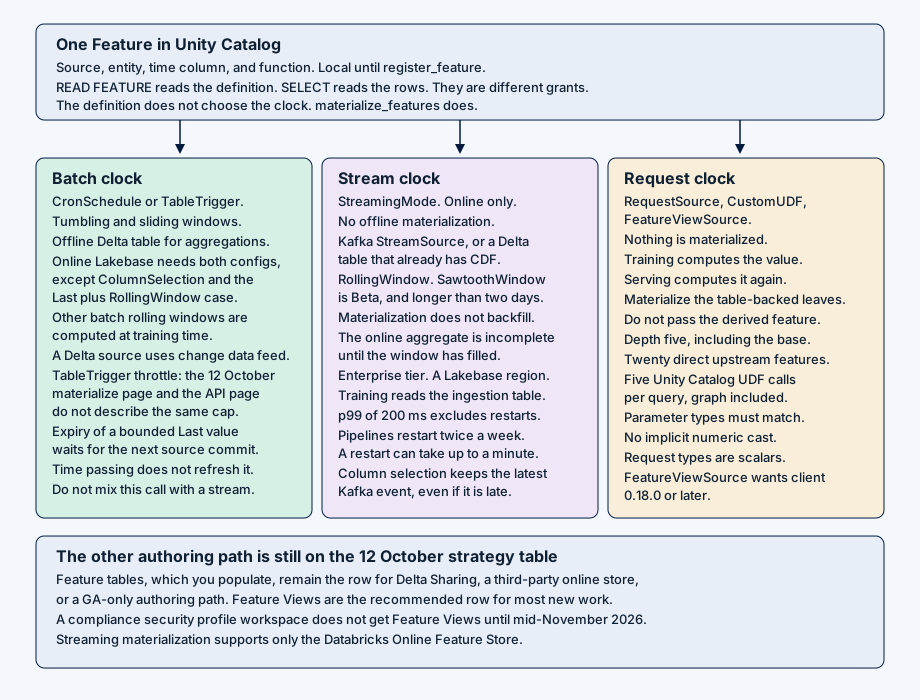
That sentence is true only for the clock the feature was given. A batch tumbling window, a streaming rolling window, and a request-time ratio are three pipelines. They share a Feature object. They do not share a trigger, a store, or a freshness promise. The July post says switching a batch source to a streaming source is a few lines of code. The October materialize page says a streaming feature and a batch feature cannot share a materialize_features call. I would keep the October sentence.
What gets registered
A feature is a source, an entity, a time column, and a function. The source is a DeltaTableSource, a StreamSource, a RequestSource, or a FeatureViewSource. The function is an aggregation, a ColumnSelection, or a CustomUDF. The API reference recommends building the object locally and calling register_feature once the training set looks right. create_feature does the definition and the registration in one step. A local object can train. It cannot materialize.
The Feature Views page asks for serverless compute or a classic cluster on Databricks Runtime 17.0 ML or above, and databricks-feature-engineering 0.16.0 or above. The online-store page, updated 9 October, still installs 0.13.0 or above and names Databricks Runtime 16.4 LTS ML. The API reference wants 0.18.0 or later once the graph uses FeatureViewSource. The serve page wants the same 0.18.0 floor for the CustomUDF examples. I would pin 0.18.0 for any feature that is not a plain aggregation or column selection, and I would not let the online-store snippet lower the runtime below 17.0 ML.
Privileges split the same way the data does. CREATE FEATURE is on the schema. READ FEATURE reads metadata. get_feature, create_training_set, and list_materialized_features need it, and it does not grant SELECT on the source or on the materialized tables. MANAGE is what materialize_features and delete_feature require. Deleting a materialized feature is narrower still: only the user who created it can call delete_materialized_feature, and MANAGE on the feature does not extend that right. Every call also needs USE CATALOG and USE SCHEMA.
from datetime import timedelta
from databricks.feature_engineering.entities import (
    AggregationFunction, DeltaTableSource, Feature, Sum, TumblingWindow,
)

spend_7d = Feature(
    source=DeltaTableSource(
        catalog_name="main",
        schema_name="payments",
        table_name="transactions",
        filter_condition="status = 'posted'",
    ),
    entity=["user_id"],
    timeseries_column="event_time",
    function=AggregationFunction(
        Sum(input="amount"),
        TumblingWindow(window_duration=timedelta(days=7)),
    ),
    name="spend_7d",
)
Entity columns cannot be DATE or TIMESTAMP. The label column must not already exist on a source used to define a feature. Entity names, time-column names, and request-column names have to be unique across every source in one training set or one endpoint. A RequestSource accepts only the scalar types in ScalarDataType. Arrays, maps, and structs stay out, and a request source cannot aggregate.
Three clocks
Materialization is a Lakeflow pipeline Databricks creates. The trigger decides which clock runs.
| Clock | Trigger | Where the value lives | What I would write down |
|---|---|---|---|
| Batch aggregation | CronSchedule or TableTrigger |
Offline Delta, and online Lakebase when both configs are passed | Change data feed on the source. A schedule. |
| Latest value | TableTrigger |
Online only, for ColumnSelection and for Last with a RollingWindow |
No offline table. Expiry waits for the next commit. |
| Stream | StreamingMode |
Online only | No backfill. Enterprise tier. A Lakebase region. |
| Request and derived | None | Computed at training and again at serving | The leaves that were materialized. The UDF packages. |
A batch aggregation that must be served online needs both an OfflineStoreConfig and an OnlineStoreConfig. The online table is fed from the offline one. ColumnSelection skips the offline config: the pipeline writes the latest row per entity, and training reads the source directly. A batch Last with a RollingWindow is the other online-only case. It is how a value gets a time bound, and the materialize page is explicit about the bound. The online value expires when a later run finds nothing inside the window. Time passing does not start that run. If the source stops committing, the last value sits until a commit arrives. The time column has to be the publish time. Offline training joins on that column, and the online store joins at the trigger. A window that is not a multiple of the publish cadence will treat a value as expired in training while it is still being served.
CronSchedule can be derived. Omit the expression, and Databricks builds one from the window, its delay and offset, and the source settling delay, so a run does not publish a window the source has not finished. Derived schedules are for tumbling and sliding windows. A manual Quartz expression is the other mode. I would use the derived schedule unless the business clock is not the window.
TableTrigger runs on a source commit. For a ColumnSelection that means every commit. For an aggregation the pipeline is throttled, and the two 12 October pages do not describe the same throttle. The materialize page says at most once per half the granularity, where granularity is the slide for a sliding window and the window length for a tumbling window, capped at one hour and never more often than every five minutes. Its example for a granularity of two hours or more is at most once an hour. The API reference says at most once per half the window length, never more often than every five minutes, and its example of an eight-hour window is every four hours. The API page also says a window under five minutes cannot use TableTrigger and must use a streaming trigger. I would not promise a four-hour refresh from the API example, and I would not drop the five-minute prohibition because the materialize page does not repeat it. I would time the pipeline.
Batch rolling windows, other than that Last case, are not materialized. Training and batch inference compute them from the source for each point-in-time lookup. The Feature Views page says to start with sliding windows, because tumbling and sliding scale better than a continuous window. The customer-analytics examples on that page are rolling windows passed to create_feature. I would not materialize those examples. They are training definitions until the function is Last.
The stream does not backfill
A streaming feature takes an online_config and StreamingMode. There is no offline_config. compute_features does not run it. Training uses create_training_set, which reads the Stream’s ingestion table and does the point-in-time join there. Batch and streaming features can sit in the same training set. They still need two materialize calls. At serving, the train page says batch features are looked up from an offline or online store and streaming features from the online store. The serve page requires a supported online materialization for every table-backed or stream-backed leaf before an endpoint exists.
The Feature Views page offers three freshness bands, and I would pick one in the design.
A StreamSource is the sub-second band. The page states a p99 end-to-end latency of 200 milliseconds. The source is named as Kafka. Columns are read as value. or key., including nested fields. At serving, and in the labeled frame used for training, the names are the leaf names, and those leaf names have to be unique across entity, time, and feature columns. transformation_sql is row-wise, and only on a StreamSource. It needs a dataframe_schema, which the page shows how to derive with LIMIT 0 against the ingestion table. A filter_condition applies before the aggregation.
A DeltaTableSource with StreamingMode is the tens-of-seconds band, for a table that already has a low-latency ingest. Change data feed has to be on. Zerobus is the third band: use it to fill that Delta table when no low-latency path exists, expect freshness on the order of tens of seconds, and set delta.enableChangeDataFeed yourself. Zerobus does not set the property.
RollingWindow is the streaming window that moves with each event. It is incomplete until materialization has run for a full window_duration. TumblingWindow and SlidingWindow are batch windows. The materialize limitations say only RollingWindow is supported for streaming aggregations, and they list Count, Avg, Sum, StddevPop, Max, Min, First, Last, FirstN, LastN, FirstDistinct, and LastDistinct. The Feature Views page and the API reference, updated the same day, add SawtoothWindow and mark it Beta. I would treat the Beta as real, and I would not treat the shorter limitations list as a ban that cancels it.
A sawtooth window is the long lookback. The trailing edge steps once a day, at a fixed 18:00 UTC cutoff, back to that day’s UTC midnight. The leading edge stays on the latest event, so the window runs a little longer than window_duration and grows through the day. Training and serving share that cutoff. The minimum duration is greater than two days. The recommendation in the API reference is a sawtooth past seven days, and a choice between sawtooth and rolling from just over two days up to seven. The two most recent days come from the stream. The rest is read from the ingestion table, which has to already cover the whole window or the result is incomplete. The page says not to serve it until two full days have elapsed. An empty window returns 0 for Sum and Count, and null for the other supported functions. delay is not supported. ApproxCountDistinct, ApproxPercentile, FirstN, LastN, FirstDistinct, and LastDistinct are not supported. A DeltaTableSource is not a legal source. start_time is not supported on a sawtooth or on any StreamSource. It is supported on a batch DeltaTableSource.
The July post says corner cases work out of the box, and it names backfilling long windows, stream features, and expiring stale rows. The October materialize page says feature backfill is not supported. A new streaming aggregation calculates forward from the moment the pipeline starts, and it is wrong until the window has passed. The August post says the ingestion-table copy used for training is also used to backfill online streaming features. I would not put that sentence in a runbook. The backfill the train page points at is the ingestion table. The online aggregate is a different store, and the October page says it does not get a historical load. Sawtooth is the documented way to start a long window from history that is already in the ingestion table, it is Beta, and it is not a backfill of a RollingWindow.
The 200 millisecond figure needs the same treatment. The August post states an end-to-end p99 of 200 milliseconds from Kafka to the online store, and it describes maintenance as a handoff: the new serverless cluster is ready before the old one stops, coordinated at five-minute checkpoints, with a failure replaying at most five minutes from Kafka. The materialize limitations say streaming pipelines restart twice a week, each restart can delay processing and add up to a minute of startup, and the p99 of 200 milliseconds excludes those restarts. I would quote the exclusion beside the number. The August post also says the online store scales to tens of thousands of reads per second at tens of milliseconds of latency. That figure is not on the online-store page I read. I would not copy it into a capacity sheet. I did not find an independent measurement of either number in the coverage around the 12 October note.
A streaming ColumnSelection has no time-to-live. Removing a value means the source emits null. Out-of-order messages are not rearranged. The latest event on the Kafka stream is what gets stored, even when its time column is earlier than an event already applied. Kafka messages may be JSON, Avro, or Protobuf. The materialize page points at a schema-registry page for the limits. I would read that page before I promised a registry.
Streaming materialization is Enterprise tier only, serverless Lakeflow, and the workspace has to be in a region that supports Lakebase. Only the Databricks Online Feature Store is supported. The July post says the same tier requirement, in one line at the bottom.
The store under the online clock
create_online_store provisions the online feature store. Stores created after 23 March 2026 are Lakebase Autoscaling projects. Capacity is a compute unit: CU_1, CU_2, CU_4, or CU_8. The page says to start at CU_2. Up to three read replicas are supported. Scale-to-zero is not supported. An online table’s catalog name has to equal the Lakebase database name, or the serving endpoint fails to deploy. materialize_features and publish_table create a matching catalog. A foreign catalog, or a catalog registered against a database with a different name, is not a serving target. Disabling high availability breaks endpoints that read the store, and the documented repair is a new store, a new endpoint, then the old one turned off. update_online_store does not apply to an Autoscaling project created through the projects API or the UI.
Customer-managed keys apply when the workspace already has a key for managed services, the store is an Autoscaling project, and that project was created after the key was available in the region. A project created earlier does not pick the key up later.
The August post’s account of why the writes stay small is the Lakebase one: compact change records instead of an 8 KB page image on the first touch after a checkpoint, acknowledged by a quorum of safekeepers. I described that storage flush on 9 October. I would not re-derive it in a feature review. The new contract is which feature is allowed to write that store, and which one must not.
publish_table is the other writer, and it belongs to feature tables. TRIGGERED is the default and needs change data feed. CONTINUOUS streams. SNAPSHOT copies. A time-series feature table deduplicates to the latest row per entity. Publishing every historical row is a table without a time-series designation, and the page says that lookup is an exact match, not a point-in-time join. New serving endpoints on Lakebase Autoscaling cannot look up features from more than one online store. Endpoints that already do continue to work.
Cost tags and a budget_policy_id stick at materialization creation. Changing the attribution means a new materialization. Deleting the last feature that shares a pipeline does not drop the tables in the same call. A background job, running as a Databricks-managed service principal, removes the offline tables, the online tables, the pipeline, and the job after a short delay. Features materialized before 20 April 2026 keep producing until every feature in that pipeline is deleted. The page says to delete and re-materialize if the pipeline needs per-feature delete.
What the endpoint is allowed to see
Online serving has two doors. A model logged with the training set looks up or computes its features from the lineage on the model. A FeatureSpec serves feature values with no model. The endpoint returns the outputs named in the spec and hides intermediates unless those features were requested too. A spec that holds Feature Views cannot also hold a FeatureLookup or a FeatureFunction.
The principal that creates the endpoint needs SELECT on the materialized table. Online lookup reads that table. A materialized table can hold more than one feature, so the grant covers every column in it. grant_feature_serving_access resolves the tables for a model or a spec, and dry_run=True reports the extra features before anything is granted. I would run the dry run and split a sensitive feature into its own materialization when the report is wider than the role.
Request columns used in training are added to the MLflow signature and have to be present on the invocation. Entity columns and time columns do not reach the inner model unless they were also declared as features. A CustomUDF does not inherit its Python packages from the Unity Catalog function’s ENVIRONMENT clause, or from the notebook. Offline execution needs the packages on the function. Serving needs them again, on log_model or on create_feature_spec. The train page says endpoints should pick up databricks-feature-lookup 1.15.0 or later for on-demand Unity Catalog functions, and that a package mismatch between the offline function and the endpoint is how the same definition returns two values. The derived feature adds no window of its own. Its upstreams keep theirs. The labeled frame still has to carry every entity, time, and request column those upstreams need, even when the training set asks only for the final feature. A registered graph allows twenty direct upstreams and a depth of five, counting the base. Training queries also sit under the limit of five Unity Catalog UDF calls, counted across the whole graph.
The Feature Views page says materialized features are served with CPU model serving. That is the sentence I read. I would not extend it to a GPU endpoint without a page that says so.
Where it fits
I would use Feature Views when the feature is new, both training and serving have to compute it the same way, and the team is willing to name the clock. A seven-day tumbling spend, materialized on a derived schedule, offline and online. A one-hour rolling sum from Kafka, online only, with the training join pointed at the ingestion table. A ratio of two materialized sums, written as a FeatureViewSource, computed at request time, with the sums materialized and the ratio left out of materialize_features. A latest device state with a one-hour Last window, online only, where a missing refresh is understood to leave the previous value in place.
I would ship the batch clock first. Registration, a tumbling or sliding window, and an offline table are the part whose limits I can put in a runbook without a Beta beside them. The stream clock is the one I would add when the decision is wrong if it waits for the next batch, and only on Enterprise, in a Lakebase region, with the restart exclusion written next to the 200 milliseconds.
Where it does not fit
I would leave Feature Views out of a compliance security profile workspace until mid-November 2026. The 12 October release notes and the what’s-coming page, also updated 12 October, both say the profile is enabled then, automatically. The HIPAA page I read was last updated 18 September. It lists Feature Views (Batch) and Feature Store Streaming Feature Views with checks across the region columns on that table, and it says some features may be listed as available before they are released. I would not treat the September check as the enablement date.
I would leave them out when the consumer is Delta Sharing, or the online store is not Databricks’. The strategy table still sends those to feature tables. Streaming materialization says only the Databricks Online Feature Store is supported. I would leave a batch rolling window out of any design that expects an online table, unless the function is Last. I would leave a brand-new streaming aggregation out of a launch that needs yesterday’s window populated tonight. I would leave sawtooth out until the Beta is acceptable, the ingestion table covers the window, and two full days have elapsed. I would leave TableTrigger off a window under five minutes. I would leave a shared materialized table in place when the SELECT grant would expose a neighboring feature the role should not see.
I would leave the online store on when the workload is idle and the bill matters. Scale-to-zero is unsupported, and the page says to delete stores that are not in use. I would leave a second online store out of a new endpoint on Lakebase Autoscaling. I would leave the August read-rate figure out of the SLO.
What goes in the design doc
Name the clock for every feature. Batch aggregation, latest value, stream, or request. The trigger, the store, and the backfill story fall out of that choice. One materialize_features call does not hold two clocks.
Pin the client and the runtime from the Feature Views page. Databricks Runtime 17.0 ML or serverless. databricks-feature-engineering 0.16.0 as the floor on that page, 0.18.0 where the graph uses FeatureViewSource or the serve examples’ CustomUDF. databricks-feature-lookup 1.15.0 or later on the endpoint. The online-store page’s 16.4 and 0.13.0 are a different install.
Write the window next to the function. Tumbling or sliding for a batch materialization. Rolling for a stream, incomplete until the window has elapsed. Sawtooth only as Beta, duration greater than two days, not served before two full days, ingestion history required, 18:00 UTC cutoff. A batch rolling window stays a training computation unless it is Last.
Record the throttle from both pages. Half the granularity, a one-hour cap, and a five-minute floor on the materialize page. Half the window, a four-hour example, and a ban below five minutes on the API page. The pipeline is the test.
Separate the two backfills. The ingestion table can hold history for training, and for a sawtooth window. The online streaming aggregate does not load that history. The July and August sentences that say otherwise are older than the limitation.
Put the grant on the table, then narrow it. READ FEATURE for the definition. SELECT on the source and on each materialized table. MANAGE to materialize. CAN USE on the Lakebase project. CREATE TABLE on the destination schemas. Only the creator deletes a materialized feature. dry_run before grant_feature_serving_access.
Put the online store’s limits on the same page. Autoscaling project if it was created after 23 March 2026. Catalog name equal to the database name. No scale-to-zero. At most three read replicas. No new endpoint that reads two stores. Customer-managed keys only for a project created after the key existed in the region. Tags and the budget policy are fixed at creation.
Quote 200 milliseconds with the restart. Twice a week, up to a minute, excluded from that p99. The August read-rate line stays in the blog.
Feature Views are the Databricks architecture that makes a feature a Unity Catalog object and then refuses to pretend that one object is one pipeline. The definition can be shared. The clock cannot. I would bet a new batch feature on the 12 October materialize page, with the offline table and the grants written down. I would bet a Kafka window on it only after the backfill sentence from July has been crossed out, and I would wait until mid-November before I bet either clock inside a compliance security profile.
References
- Databricks, “October 2026” release notes, Feature Views generally available on 12 October 2026. https://docs.databricks.com/aws/en/release-notes/product/2026/october
- Databricks, “What’s coming?”, Feature Views on compliance security profile workspaces in mid-November 2026, last updated 12 October 2026. https://docs.databricks.com/aws/en/release-notes/whats-coming
- Databricks, “Databricks Feature Store,” last updated 12 October 2026. https://docs.databricks.com/aws/en/machine-learning/feature-store/
- Databricks, “Feature Views,” last updated 12 October 2026. https://docs.databricks.com/aws/en/machine-learning/feature-store/feature-views
- Databricks, “Materialize Feature Views,” last updated 12 October 2026. https://docs.databricks.com/aws/en/machine-learning/feature-store/materialized-features
- Databricks, “Train models with Feature Views,” last updated 12 October 2026. https://docs.databricks.com/aws/en/machine-learning/feature-store/train-with-declarative-features
- Databricks, “Serve Feature Views,” last updated 12 October 2026. https://docs.databricks.com/aws/en/machine-learning/feature-store/serve-declarative-features
- Databricks, “Feature Views API reference,” last updated 12 October 2026. https://docs.databricks.com/aws/en/machine-learning/feature-store/feature-views-api-reference
- Databricks, “Databricks Online Feature Stores,” last updated 9 October 2026. https://docs.databricks.com/aws/en/machine-learning/feature-store/online-feature-store
- Nick Joung, Ian Ackerman, and Julia Powell, “Introducing Feature Views,” Databricks Blog, 10 July 2026. https://www.databricks.com/blog/introducing-feature-views
- Ian Ackerman, Nick Joung, and Abhay Bothra, “How Databricks Feature Store serves features with sub-second freshness,” Databricks Blog, 17 August 2026. https://www.databricks.com/blog/how-databricks-feature-store-serves-features-sub-second-freshness
- Databricks, “HIPAA,” last updated 18 September 2026. https://docs.databricks.com/aws/en/security/privacy/hipaa